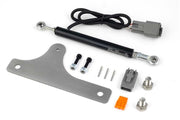
You'll only see this node after choosing Voltage Input as the Selector Position Type inside Gear Detection. That's the setup you'd use with a position sensor that outputs a different voltage for each lever position, such as Haltech's TH400 standard case or TH400 Reid case selector position kits.
Calibrating it
- Toggle Enable on for every position your selector actually has. Leave the rest off.
- Move the lever into the first enabled position.
- Press Calibrate for that position. NSP captures the voltage the sensor is reading right now and stores it as the Nominal Voltage.
- Repeat for each enabled position.
Do this with the sensor fully installed and the linkage adjusted, because any change afterward shifts the voltages.
The two values
- Nominal Voltage: the reading the sensor gives with the lever in that position. Calibrate fills it in for you.
- Voltage Tolerance: a window above and below the nominal voltage. If the reading lands inside that window, the ECU treats the lever as being in that position.
Our advice: keep the tolerance wide enough to cover normal wobble in the linkage and sensor, but narrow enough that neighboring positions' windows never overlap. Then run the lever through every position slowly while watching the live channel, and confirm it never shows the wrong gear in between.
Related: Gear Position and Gear Switch.