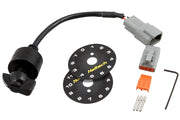
What a rotary trim module does
The 12-position rotary trim module (HT-010504) is a dash-mounted switch that outputs a different voltage at each click. The Elite reads that voltage, works out which position the knob is in, and uses it to trim a function. The classic example is boost control, where the knob lets the driver choose between boost settings on the fly, but trims can be applied to other functions within ESP too.
Wiring tab
The module needs an analog input. An AVI is the preferred choice. If you've used them all, an SPI will do the job.
| Setting | AVI (preferred) | SPI (if no AVI is free) |
|---|---|---|
| Pull up | Disabled | Disabled |
| Sensor Type | - | Hall Effect (use this for any analog signal on an SPI) |
| Pull-up resistor if enabled | 1k to 5V | Weaker 10k to 5V |
The pull-up must be Disabled for a rotary trim module, on an AVI or an SPI. The module already produces its own stepped voltage. A pull-up adds a second path to 5V that drags those voltages upward, and the ECU then reads the wrong position, or jumps between positions.
Calibration tab
This tab tells ESP which voltage belongs to which of the 12 positions. A calibration for the Haltech module comes with the ESP software, so for most installs you just load it. Click the yellow open icon to load a calibration file, or the blue disk icon to save one.
You'd only build a custom calibration if you're using a different switch, or if you've measured slightly different voltages at each position on your install. In that case, click through each position with the key on, note the voltage ESP reports, and set each position's value to match.
Setting it up, step by step
- Wire the module's supply, ground and signal, with the signal to a free AVI.
- In ESP, enable the Rotary Trim Module function and select that AVI as its input.
- Set the pull-up to Disabled.
- Load the pre-installed calibration from the Calibration tab.
- With the key on, click through all 12 positions and confirm ESP follows the knob exactly.
- Assign the trim to the function you want, such as boost, and set how much each position changes it.
Troubleshooting
| Symptom | Usually |
|---|---|
| Reads the wrong position, or several positions read the same | Pull-up left enabled |
| Position flickers between two values | Poor ground or a signal wire running alongside ignition wiring |
| Stuck at one end of the range | Missing supply or ground to the module |
On a Nexus ECU instead? See the Nexus rotary trim module article. For help choosing what to put on the knob, book a free consultation.