Why log oil temperature?
Coolant temperature is controlled by a thermostat and a radiator, so it often looks fine right up until the oil is cooked. Oil temperature shows the real thermal load on bearings and turbochargers. It also tells you when a cold engine is actually ready for full throttle. On an Elite, the reading is available for datalogging, for on-screen warnings and as an input to Engine Protection.
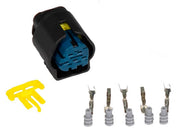
Most oil temperature sensors are simple two-wire thermistors, meaning their resistance changes with temperature. One wire carries the signal to an ECU input, and the other goes to signal ground. Haltech's high-range oil temperature sensor is a common choice, and the Bosch-style plug and pins make the connector side easy.
Step 1: tell ESP what kind of sensor it is
On the Wiring tab, Input Type depends on how your sensor's data is written, not how the sensor looks:
| Input Type | Pick it when | Needs |
|---|---|---|
| Analogue Voltage | The manufacturer's calibration lists temperature against volts | An AVI |
| Analogue Resistance | The data sheet lists temperature against ohms, which is common for plain thermistors | An AVI |
| Thermocouple Type K | You're using a K-type thermocouple, usually through a Haltech TCA2 or TCA4 thermocouple adaptor | The adaptor's channel |
If the sensor came with a table in ohms, choose resistance and enter the numbers as supplied. Converting them to volts by hand is an easy way to introduce errors.
Step 2: choose and set up the input
Using an AVI (preferred)
Analog voltage inputs are the natural home for a temperature sensor. The key setting is Pull up, which connects a 1k resistor from the input to 5V. A two-wire thermistor makes no voltage of its own, so the pullup gives it something to divide. The voltage the ECU sees then rises and falls with the sensor's resistance.
- Two-wire sensor wired only to the Haltech: pullup on.
- Sensor with its own power supply: pullup off.
- Sensor shared with another ECU, such as a factory ECU in a piggyback install: usually off, because the other ECU already provides the pullup. Two pullups in parallel will skew the reading.
Using an SPI when you've run out of AVIs
A spare SPI (synchronized pulsed input) can read a temperature sensor too. Set Sensor Type to Hall Effect, which is right for any analog signal on an SPI. The pullup follows the same rules as above, but on an SPI it's a weak 10k resistor instead of 1k. That changes the voltage for a given temperature, so the standard calibrations won't read correctly as they are. Expect to adjust the calibration. Our guide to temperature sensors on an SPI covers how.
Step 3: load a calibration
With either analog input type, the Calibration tab holds the table that turns voltage or resistance into temperature. ESP comes with a library of calibrations, and it starts with Haltech's 150 °C (302 °F) oil temperature sensor loaded. Use the Open icon to load a different one. If your sensor isn't listed, build a table from the manufacturer's data and save it with the Save icon so you can reuse it on the next car.
After a cold soak overnight, oil temperature should read within a few degrees of coolant and air temperature before you start the engine. If it's way off, the calibration or the pullup is wrong.
Step 4: set warnings on the Display tab
Warning Minimum and Warning Maximum make any oil temperature gauge or readout in ESP flash red when the value falls below or rises above them. They only affect the display, but they're a quick way to catch a problem while you're tuning. We set the low warning to remind us the engine isn't warm enough for hard pulls yet, and the high warning a little below the oil's safe limit.
Step 5: diagnostics and protection
The Diagnostics tab can raise fault codes for two kinds of problem: wiring faults and real overheating. All four checks are off by default.
| Setting | Code | What it catches | Our advice |
|---|---|---|---|
| Raw Min | P0197 | Input voltage too low, which usually means a short to ground | Enable it and set it below anything the sensor produces when working |
| Raw Max | P0198 | Input voltage too high, which usually means an open circuit or unplugged sensor | Enable it and set it just under the voltage you see with the plug disconnected |
| Operating Min | P0195 | Oil colder than the limit you set | Useful on race cars to flag hard running on cold oil |
| Operating Max | P0196 | Oil hotter than the limit you set | Set it from your oil and bearing supplier's limits, and confirm in logs |
With Engine Protection active, each of these can be given a DTC Severity, so the ECU can respond with something like a power reduction instead of just logging it. Test the response on the dyno before you trust it on the track.
Troubleshooting
| Symptom | Usually |
|---|---|
| Reads extremely cold all the time | Open circuit, a broken wire or an unplugged sensor |
| Reads extremely hot all the time | Signal shorted to ground |
| Wrong by a steady amount | Wrong calibration, or an SPI used without adjusting the calibration |
| Jumps around | Poor ground, or a signal ground shared with noisy loads |
FAQ
Where should the oil temperature sensor go?
Somewhere with steady oil flow, such as the filter housing, a sandwich plate or the oil gallery feed. Avoid dead ends where oil sits still.
Can I use one sensor for both oil pressure and temperature?
Yes. Combined sensors exist, and the temperature side sets up just like this. The pressure side is configured separately as an oil pressure sensor.