What long term trim is for
In closed loop boost control, the ECU starts each pull from your closed loop base duty table, then corrects on the fly. If that base table is a little off, the controller corrects by the same amount every single time. Long term trim (LTT) watches those repeated corrections and stores them in their own table, so the starting duty is already closer to right. The result is less work for the PID controller and smoother, more repeatable boost.
The risk is teaching it something false. If it learns while the turbo physically can't reach target, it will pile on duty that isn't needed once conditions change. Nearly every LTT setting exists to stop that.
Enable and guard conditions
| Setting | What it does | Our advice |
|---|---|---|
| Enable Long Term Trim | Turns learning on | Only once your base table is already close |
| LTT Min TPS | Learning only happens above this throttle opening | High enough that part-throttle cruising can't teach it anything |
| LTT Min RPM | No learning below this RPM | Set it where the turbo can actually reach target, so spool isn't learned as an error |
| LTT Max RPM | Upper RPM bound for learning | Stop learning where the turbo runs out of efficiency and can no longer hold target |
| LTT Min Gear | Learning only happens in this gear or higher | Skip the low gears, where the turbo may not reach full speed before the shift |
You'll also find two buttons:
- Reset sets every value in the long term trim table back to zero.
- Apply To Base Table folds the learned corrections into the closed loop base duty table, then zeroes the trim table.
The two tables
Long Term Trim Gain
Sets how quickly corrections are learned, with up to 3D mapping. Bigger numbers learn faster but can start to oscillate, overcorrecting one way and then the other. Smaller numbers learn slowly and steadily. We prefer slow and steady.
Long Term Trim
This is what has been learned so far, with up to 4D mapping. You can set its axis breakpoints, but the axis channels are locked to the same ones used by the closed loop base duty table, so each cell lines up with a base duty cell. You can also edit this table yourself while learning is still running.
How we use it
- Get the base duty table close by hand, with learning off.
- Enable LTT with conservative gains and guard settings.
- Drive or dyno normally and review the trim table. Small, consistent values are good. Big or erratic ones mean the guard settings are too loose, or there's a mechanical issue like a boost leak.
- When you're happy, use Apply To Base Table, then let it keep learning from zero.
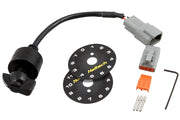
If a driver trims boost from a dash knob like the 12-position rotary trim module, make sure your guard settings keep learning to the conditions you actually want recorded.
Related Nexus pages: proportional gain, integral gain and boost corrections.