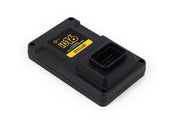
What the IO16 is for
Every build eventually wants one more sensor or one more output than the ECU has spare. The Nexus IO16 is Haltech's answer: a slim CAN box that works with both Nexus and Elite ECUs and gives you 16 extra channels you assign in NSP exactly like the ECU's own pins. Because it only needs a CAN connection back to the ECU, we often mount it at the back of the car near a fuel system, transmission or rear sensors, and save running a long bundle of wires forward.
You can run up to two IO16s on one ECU, for 32 extra channels in total.
What you get
| Channel type | Qty | Good for | Key limits |
|---|---|---|---|
| Analog Voltage Inputs (AVI) | 6 | Pressure, temperature and position sensors, plus switches | Reads 0 to 5 V, 100 samples per second, 1.5 kHz max signal, tolerates -10 V to 30 V continuously |
| Synchronized Pulsed Inputs (SPI) | 4 | Frequency and duty signals like flex fuel sensors, wheel or driveshaft speed, plus analog sensors | 0 to 12 V digital or 0 to 5 V analog, up to 15.9 kHz, tolerates -15 V to 30 V continuously |
| Half Bridge Outputs (HBO) | 6 | Stepper and DC motors, low-side switching, or 12 V high-side feeds such as transmission solenoids | 8 A source or sink, 0 to 100% duty, 2.2 kHz switching, overcurrent and overtemperature protected |
Both input types have a 1k pull-up to 5 V you can switch on in software. The HBOs also report their own voltage (0 to 27 V) and high-side current, which is handy for diagnostics. Everything comes through a single 34-pin AMP Superseal connector.
For wiring you have two choices: the IO16 with plug and pin kit if you are building your own loom, or the 2.6 m (8.5 ft) universal wire-in harness if you want the connector pre-populated with flying leads.
Before you start: software versions
The IO16 needs reasonably current software on both ends. Check these first, because an out-of-date ECU simply won't show the IO16 options:
- NSP: 1.40.x or later
- Nexus ECU firmware: 1.29.x or later
- Elite ECU firmware: 3.13.x or later
NSP comes from the downloads section of Haltech's own site and installs with a normal Windows setup wizard. Once it's installed, confirm your ECU firmware meets the minimum above before you add the IO16.
Getting it online in NSP
- Enable it in the ECU. Connect to the ECU over USB. In the navigation tree, open Connections > CAN > Haltech CAN System and tick IO16 under Input/Output Expander Boxes.
- Plug it into the Haltech CAN bus. A male DTM-4 to male DTM-4 Haltech CAN cable goes straight into the ECU, or into a spare port on a CAN hub if you already run other Haltech devices.
- Power up and check. Key on, and the IO16 should show as Connected in NSP. Its channels then appear in the IO report, ready to assign.
Most Haltech ECUs have more than one CAN channel, and one of them may be set up for OBD-II or the car's own CAN network. The IO16 has to sit on the channel assigned to the Haltech CAN system, or it will never connect. Our Haltech CAN system article explains how the channels are allocated.
Running two IO16s: Box A and Box B
With two IO16s on one bus, the second one needs a different device ID so the ECU can tell their channels apart. The fix is quick:
- Unplug the first IO16 so only the unit you want to change is on the bus.
- Open the IO16's main page in NSP and choose Change ID of Device, for example from Box A to Box B.
- When NSP confirms the change, reboot the ECU and the IO16, either with the reboot button in NSP or by cycling the ignition.
- Plug the first unit back in. Both boxes now show up with their own channels.
We label the boxes physically as well. When you're chasing a fault two years later, knowing which box is B without plugging in a laptop saves time.
Wiring it in
Power and ground
For full output capability, run the IO16's power pin from a fused 30 A constant battery feed and its ground straight to battery ground. That supply is what the HBOs draw from when they drive a load high or low. Switching the unit on and off is still handled over the CAN connection, whenever the CAN system is powered.
You can power it through the CAN cable alone, but that limits the available current. We only do that when the IO16 is purely reading sensors on its AVIs and SPIs and none of the HBOs are used.
If any HBO is in use, the IO16 must have its own constant power and battery ground wired as above. Driving motors or solenoids with CAN power alone is asking for trouble.
Sensor power and grounds
The IO16 has several regulated 5 V supply pins and several sensor ground pins, so a three-wire sensor like a MAP sensor, pressure sender or position sensor can be powered right at the box. Any 5 V pin can pair with any sensor ground pin.
What you must not do is tie the IO16's sensor ground to the ECU's sensor ground, or to power ground. Doing either creates a ground loop, and the symptom is sensor readings that wander with electrical load. Sensors wired to the IO16 should be powered and grounded by the IO16.
Using the inputs and outputs
- AVIs read a 0 to 5 V signal. For switches, set the On and Off voltage thresholds in NSP; you can watch the live AVI voltage to pick sensible values. Turn on the pull-up for two-wire temperature sensors and switch-to-ground inputs.
- SPIs measure frequency and duty, so they are the right choice for a flex fuel sensor or a Hall or reluctor speed sensor. They can read analog sensors too, which is useful when you run out of AVIs.
- HBOs are push-pull PWM outputs. They can pull a load to ground, feed it 12 V, or drive a motor in both directions. They can also act as switched 12 V feeds to other circuits.
Not everything belongs on a CAN expander. Functions that need precise timing or instant response should stay on the ECU's own pins. Check the list of ECU functions not suitable for CAN IO before you plan your pin allocation.
Pinout, dimensions and spec sheet
Haltech publishes a pinout drawing, dimension drawing and full specification sheet for the IO16. You'll want the pinout when you're building the loom, and the dimensions when you're deciding where it can mount.
Need this diagram? Ask us and we'll send it over with advice for your build.
Troubleshooting
| Symptom | Usually |
|---|---|
| IO16 option missing in NSP | NSP or ECU firmware older than the minimum versions |
| Shows as disconnected | Plugged into a CAN channel that isn't the Haltech CAN system, a damaged cable, or IO16 not ticked in the CAN settings |
| Second box never appears | Both units still on the same device ID |
| Outputs weak or cutting out | Unit powered through CAN only, or a missing 30 A feed or battery ground |
| Sensor readings noisy or offset | Sensor ground tied to the ECU or to power ground, creating a ground loop |
Nexus IO16 FAQ
Does the IO16 work with an Elite ECU?
Yes, as long as the Elite is on firmware 3.13.x or later and you configure it through NSP.
IO16 or IO-12?
The IO-12 is a 12-channel expander. The IO16 gives you 16 channels, and its half bridge outputs can drive a load both high and low. Not sure which suits your build? Ask us.
How many can I add?
Two per ECU, set as Box A and Box B. If you need more than that, talk to us about the rest of the system, because there is usually a better way to split the job.