What the APP does
In a drive-by-wire system there's no cable between your foot and the throttle. The accelerator pedal position (APP) sensor reports how far the pedal is pressed, and the ECU moves an electronic throttle body to match. You need an ECU with drive-by-wire control, such as an Elite 1500 or 2500, or a Nexus R3, R5, S3 or S2.
Connecting it
The simplest option depends on your setup:
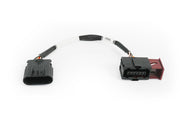
- Nexus Rebel LS: the VE Commodore pedal adaptor harness plugs straight in.
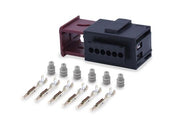
- Custom wiring: the VE Commodore APP plug and pins give you a proper factory-style connection.
The pedal has two independent sensors, and each needs its supply, ground and signal wired to the matching ECU pins. The pinout and factory wiring diagram are drawings. Need this diagram? Ask us and we'll send it over with advice for your build.
Calibrating in NSP
- Wire both the pedal and the electronic throttle body, then connect to NSP and open the Drive By Wire calibration.
- With your foot off the pedal, click calibrate. Then press the pedal all the way down and click calibrate again. That teaches the ECU the pedal's full range.
- Click calibrate for the throttle, and the ECU runs its automatic throttle calibration.
Afterward, press the pedal slowly and watch the throttle follow. If anything faults, our DBW diagnosis guide walks through what to check, and DBW calibration covers the process in more detail.