Why flex fuel needs its own tuning approach
Ethanol carries less energy per pound than gasoline, so the engine needs more of it to reach the same lambda. Stoichiometric for gasoline is 14.7:1. For pure ethanol it's 9.0:1. In practice most of our customers run anything from straight pump gas (E0) up to E85, and a few regions sell fuel close to E100.
Fuel quantity is only half the story. As the ethanol percentage climbs, the fuel resists knock better, so the engine can take more ignition timing. That gain isn't a straight line either. Most of the octane benefit has arrived by roughly E60, and the last stretch to E85 adds comparatively little. A good flex tune has to account for both the extra fuel and the non-linear timing change.
Years ago the usual trick was a dash switch that flipped between a gas map and an E85 map. The flaw is obvious once you've owned an ethanol car: unless you drain and flush the whole system, the tank is almost never exactly E0 or exactly E85. It's some mix, and a two-map setup is wrong for every mix except the two it was tuned on. A composition sensor fixes that by telling the ECU the real ethanol content so it can blend fuel and timing to match.
The method below relies on 4D tables, where the ethanol percentage becomes an extra axis. When Haltech wrote their guide, that meant the Elite 1500 and Elite 2500. If you're not sure your ECU supports 4D mapping, ask us before you start.
The flex fuel sensor
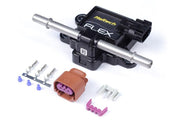
The Haltech flex fuel composition sensor has fuel flowing between two probes. Ethanol and gasoline affect the capacitance between those probes differently, and a small processor inside the sensor turns that into a signal for the ECU. It's a clever single-wire design: the frequency of the signal reports ethanol percentage, and the pulse width of the same signal reports fuel temperature. One input, two useful channels.
Wiring it
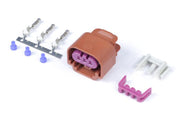
The pin labels are printed on the sensor body. If you're building your own plug, the plug and pins kit is the right part.
| Sensor pin | What it is | Connect to |
|---|---|---|
| VCC | Sensor power | Switched 12V (Grey/Red in Haltech harnesses) |
| Gnd | Sensor ground | Signal ground (Black/White) |
| Out | Ethanol % and fuel temperature signal | Any unused SPI or DPI |
If you're using shielded cable, peel the shield back carefully to get at the core. The shield must never touch the signal wire.
Where to mount it
The closer the sensor sits to the injectors, the better. Every inch of line between them is a delay between the ECU reading a new blend and that blend actually being burned, and during that window the ECU is correcting for fuel that isn't in the cylinder yet. That can show up as rough running right after a fill-up.
- Best: the high pressure feed going to the rail, where fuel is always moving past the probes.
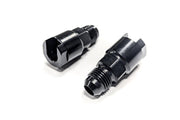
- Watch flow: on high-flow systems, make sure the sensor isn't a restriction. If it is, tee it into a parallel branch alongside the main feed so fuel can bypass it. The -6AN fittings make the plumbing easier.
- Return line: common and convenient, but return fuel can be aerated, and bubbles make the reading jump around. If you go this route, use the sampling threshold settings described below so the ECU only trusts the sensor when most of the fuel is heading back to the tank.
Setting up the sensor in ESP
With the Elite connected and online:
- Open Main Setup (the gear icon), then Functions.
- If Flex Fuel Composition/Temperature Sensor isn't listed, use Add/Remove Function to move it into the active list and click OK.
- On its Wiring tab, use Edit Connection to pick the input you wired (SPI-1, for example). Set Edge Select to
RISING, Sensor Type toHALL EFFECTand Pullup toENABLED. The Frequency Time Constant can stay at 1. - Fill in the Calibration-Fuel and Calibration-Temperature tabs with the values for the HT-011000. If you don't have them handy, ask us and we'll send them over.
- Optional: the Sampling Threshold - Fuel tab limits when the reading is taken. Haltech's example samples only under 1500 rpm and under 10 kPa, which is basically idle, when injector demand is low and return flow is high.
- Under Engine, open the Fuel tab and change Fuel Type to
FLEX FUEL. You'll notice the Fuel Comp Correction tables stay off, and a Fuel Composition Scalar table appears instead.
Ethanol percentage and fuel temperature now show up as channels you can log and display. It's also worth reading how flex fuel control works for the background on what the ECU does with them.
Our three-stage tuning method
You could tune every blend by hand, but it would take forever and you'd need a tank of each. This approach gets both ends right on the dyno, then lets the ECU learn the middle. Haltech's walk-through uses a V8 with a WB2 dual wideband, but it works the same on a four or a six.
Stage 1: a complete gasoline tune
Start with as little ethanol in the system as possible, ideally before any has ever been added. Everything later is built on top of this baseline, so it needs to be finished, not "close enough":
- Target AFR (lambda) table set for gasoline
- Injector flow and dead time data as accurate as you can get it
- Boost targets suited to the gasoline you're running
- Every fuel and ignition base table, plus the corrections, tuned
Don't move on until you're happy with how it drives on gas.
Stage 2: add an ethanol axis and tune E85
Drain the fuel system properly and refill with E85. Some tuners add a little E85, run it through, drain again and then fill with fresh E85, just to get the reading as high as possible. The goal is to start this stage near the top of the ethanol range.
Next, give the relevant tables a flex fuel axis. A 3D table (fuel, target lambda, ignition base) becomes 4D. A 2D table (boost target, prime pulse) becomes 3D. Select the table, click Table Axis Setup, enable Axis 3, choose the flex fuel sensor, and enter just two breakpoints: 0 and whatever your tank currently reads, say 85.
A slider now sits under the table. At 0 you're editing the gas tune you already did. Drag it to 85 and you're editing a separate layer that has no effect on the gasoline values. For now, you effectively have two maps, one for each end.
Give the same extra axis to these tables:
- Bank 1 Long Term Fuel Trim (Bank 2 copies its axis automatically)
- Fuel Base
- Fuel Prime Pulse and Fuel Cranking
- Ignition Base
- Boost Control Closed Loop Base Duty Cycle and Closed Loop Target Pressure
Then put the slider at 85 and tune the car again, top to bottom, on E85. Two habits save headaches here. First, double-check the slider position before every edit, because tuning the wrong layer is an easy mistake. Second, press the Space Bar in any table and ESP jumps to the cell the ECU is using right now.
Expect boost duty to need attention. Ethanol produces more exhaust gas volume, which can change how much duty it takes to hold the same boost. Adjust the closed loop base duty at the 85 position to suit.
The Fuel Composition Scalar table is already blending the stoichiometric difference in the background. The layered tables are there so you can correct anything that math doesn't cover, like injectors whose data isn't quite right.
Stage 3: fill in the middle blends
With both ends tuned, add a couple more breakpoints to the ethanol axis. Around 25 and 50 gives good coverage. Because the ends are already right, the new sites start out interpolated, so they're close before you touch them. You only really need this on Fuel Base and Long Term Fuel Trim. As the driver fills up with different blends over the following weeks, long term fuel trim learns the small differences at each site.
Ignition is mostly handled by the scalar table. If you want more precision and the engine has a knock sensor, give the knock control long term trim table and the Ignition Base the same ethanol axis. Our knock control article covers that side.
Troubleshooting
| Symptom | Usually |
|---|---|
| Ethanol reading jumps around | Aerated fuel in a return-line mount, or the shield touching the signal wire |
| Runs rich or lean for a few minutes after filling up | Sensor too far from the rail, so corrections arrive before or after the new fuel |
| Edits don't change how the car runs | Slider is on the wrong ethanol position; use Space Bar to find the active cell |
| Boost drops or overshoots on E85 only | Closed loop base duty at the ethanol breakpoint needs retuning |
Flex fuel FAQ
Do I need to tune every ethanol percentage?
No. Tune E0 and your highest blend properly, add a couple of sites in between, and let long term learning refine them.
Can I skip the gasoline tune and go straight to E85?
We don't recommend it. The gas tune is the reference everything else sits on, and injector data errors are much easier to find there.
Want us to handle it?
Flex fuel is one of the most common jobs we do. Book a free 30-minute consultation and we'll talk through your fuel system and ECU.